
Call (218) 590-5611
Call (218) 590-5611
Software plus hands-on financial operations
Your CRM can tell you what one roof made, if every cost gets entered right. It can't tell you whether the company is on plan this week. TradeBooks tracks overhead, margin, leads, and revenue against the plan you set, every week, so you stop finding out at year end.

Built by a contractor, for contractors
Built by a contractor, for contractors
Managed or self-managed plans
No contracts, cancel anytime
Roofing profitability software shows a roofing contractor whether the business is making money, not just whether a single job did. TradeBooks works alongside your existing accounting workflow, most often QuickBooks, and reports overhead percentage, gross margin by job, cost per lead, and plan vs. actual each week. On managed plans, the TradeBooks team keeps entries current, generally within 48 hours.
Overhead is everything you pay that isn't tied to one job: office, trucks, insurance, estimators. Bid with the wrong overhead percentage and every roof you sell comes up short.
After a storm the pipeline fills fast, but payroll and materials come due weeks before the checks clear. Without tracking lead-to-sale lag, a record month can turn into a cash crunch.
Overhead is everything you pay that isn't tied to one job: office, trucks, insurance, estimators. Bid with the wrong overhead percentage and every roof you sell comes up short.
Software plus hands-on financial operations
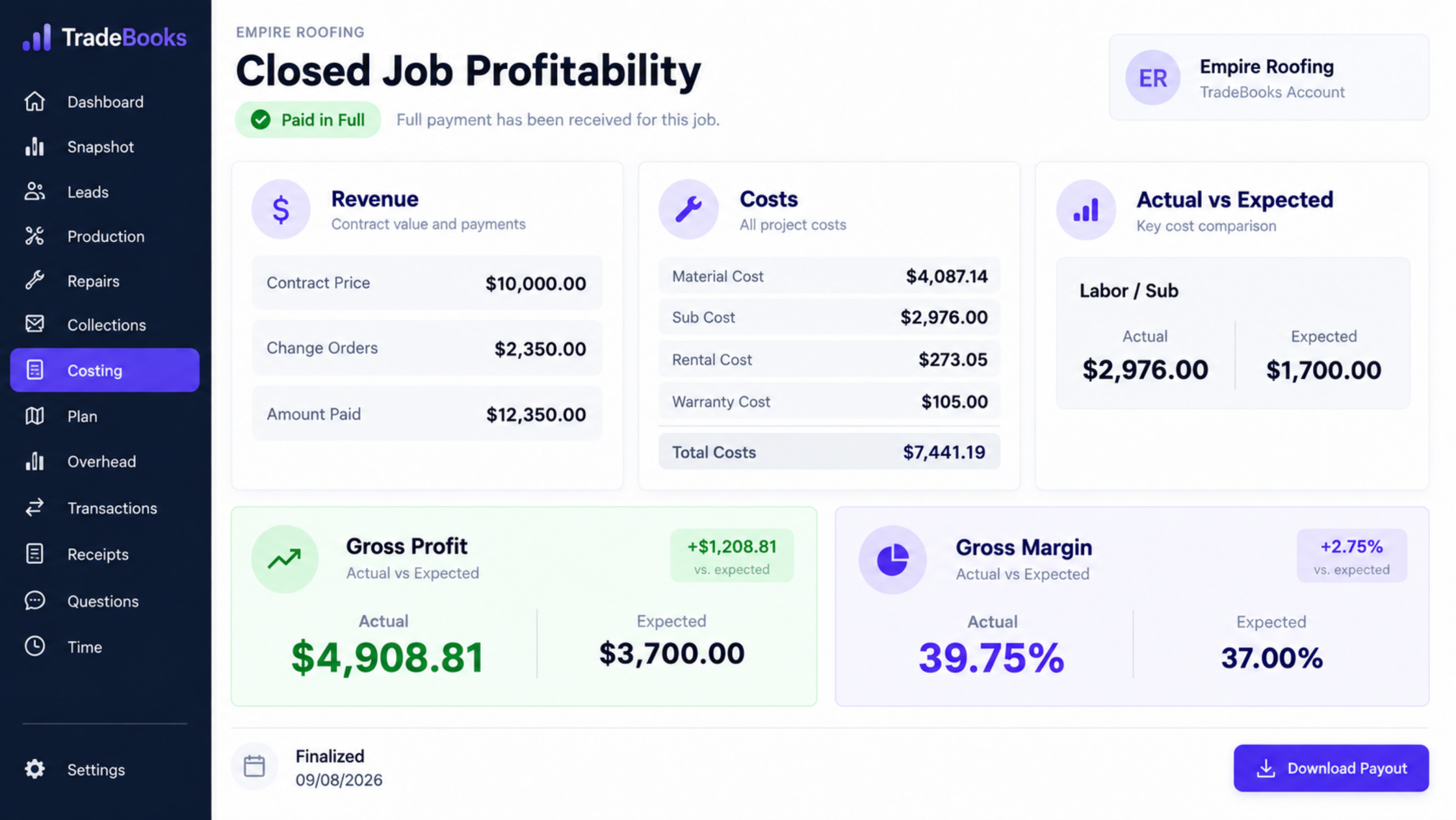
TradeBooks is roofing financial management software that plans your year, tracks every week against it, and shows you where you're off before it costs you. Four tools do the work inside the TradeBooks platform.
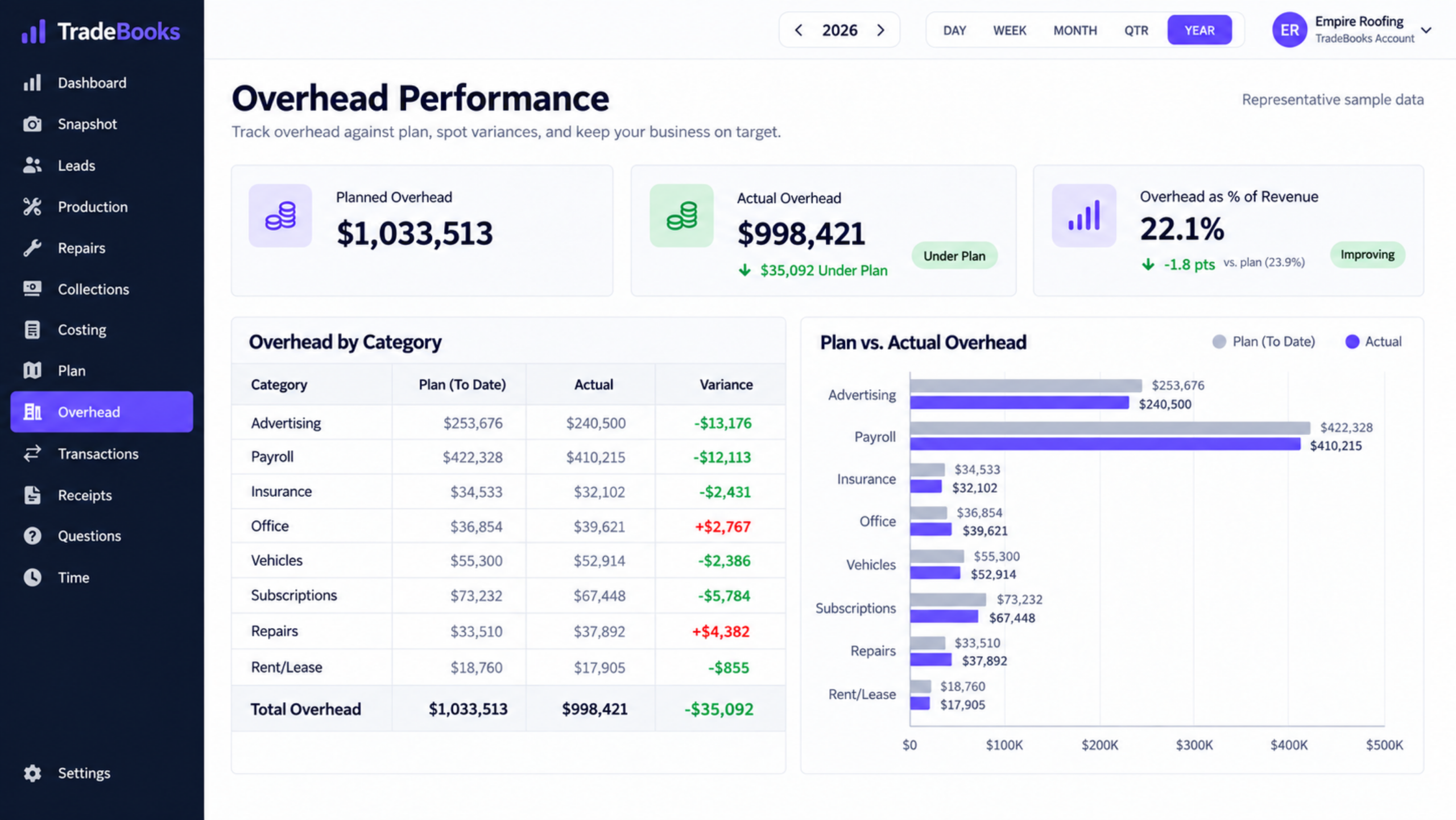
Set an overhead budget by category, then see actual spending against it every week. You catch overhead creep in the month it starts, not at tax time.
Build the year around your real season, slow months and storm spikes included. The forecast accounts for lead-to-sale lag, and sales goals by rep show who's on pace.
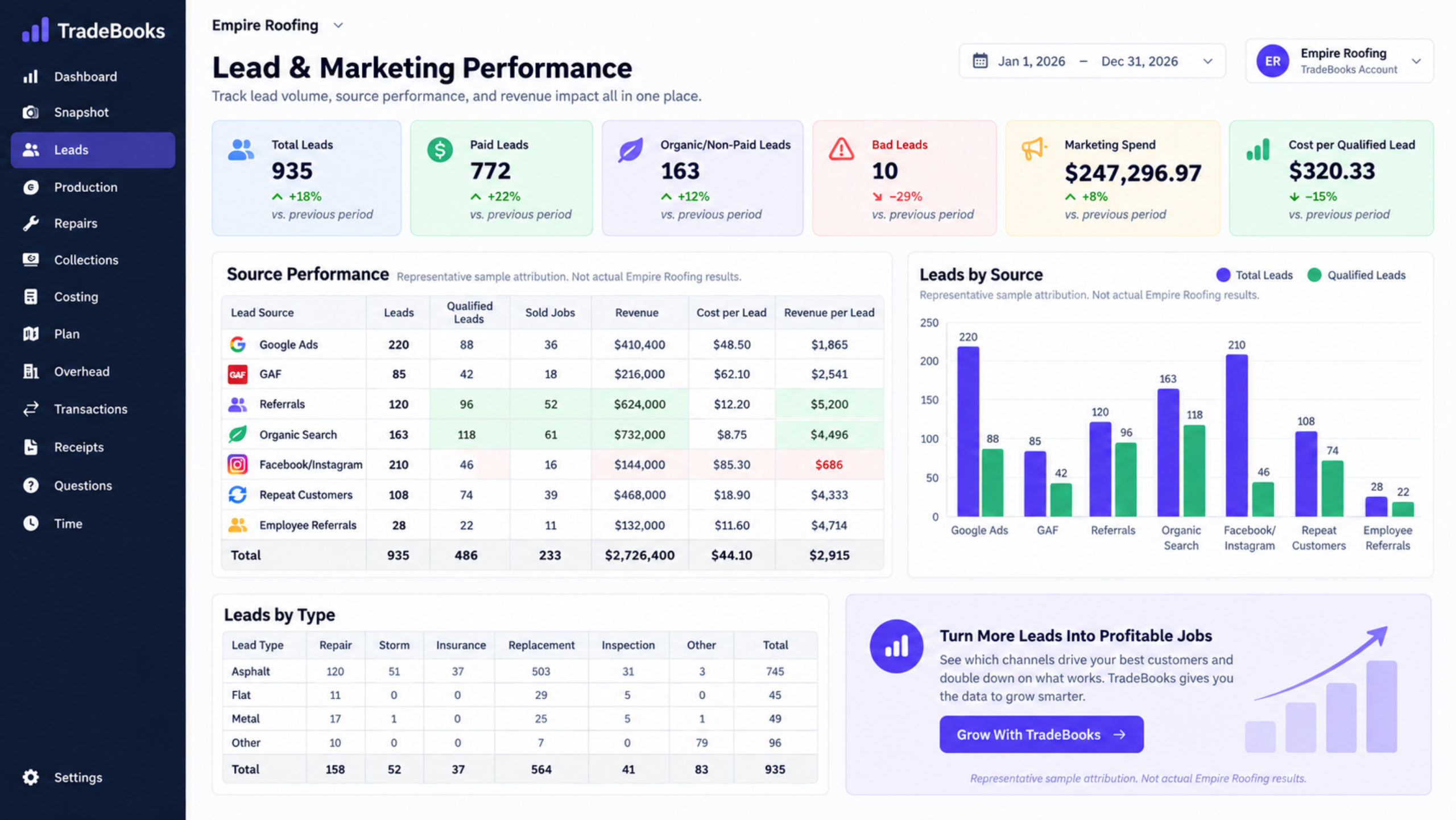
Track cost per lead and revenue per lead for paid and organic sources side by side. Put the next marketing dollar behind the sources that sign roofs, and cut the ones that only fill the inbox.
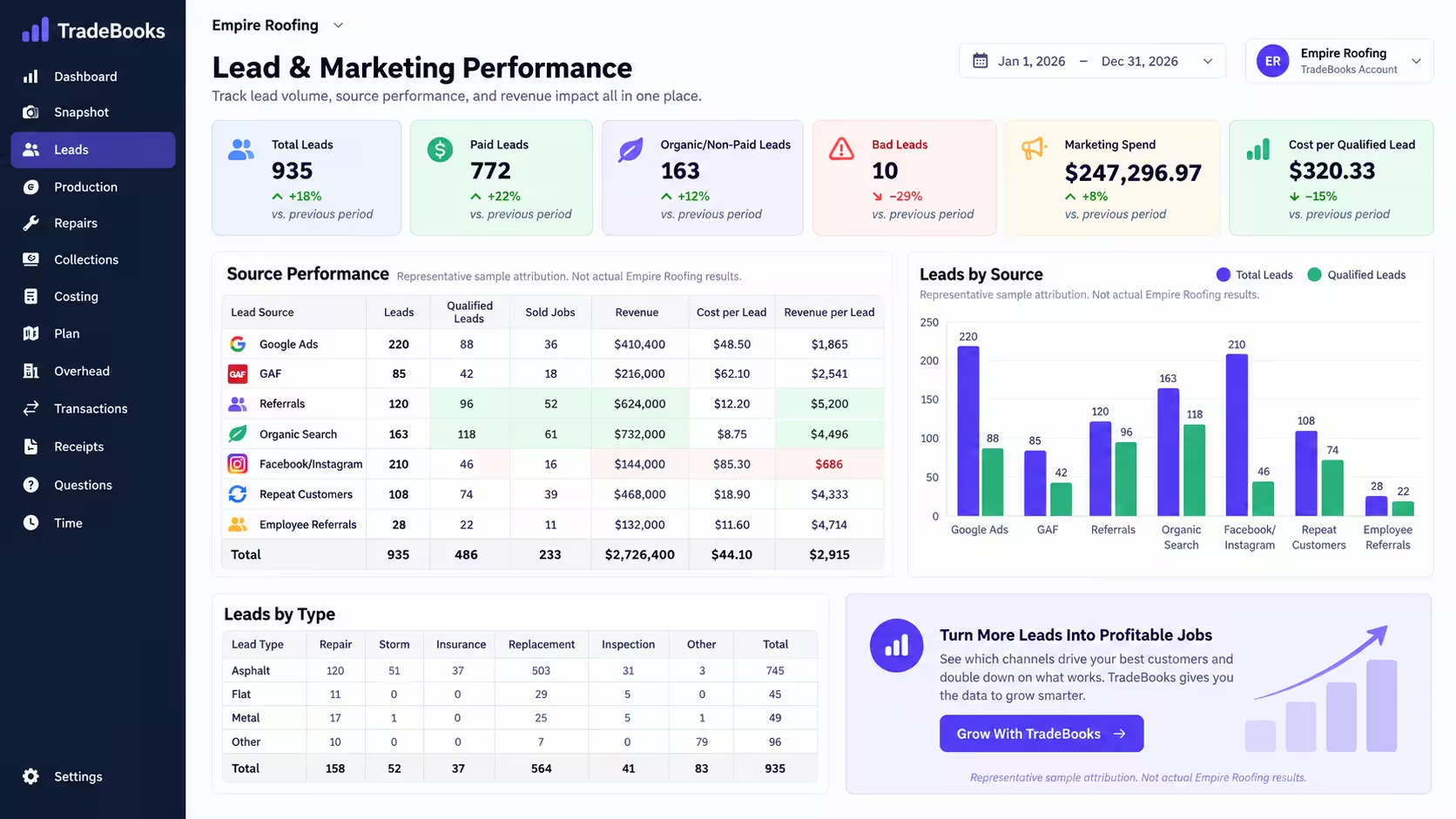
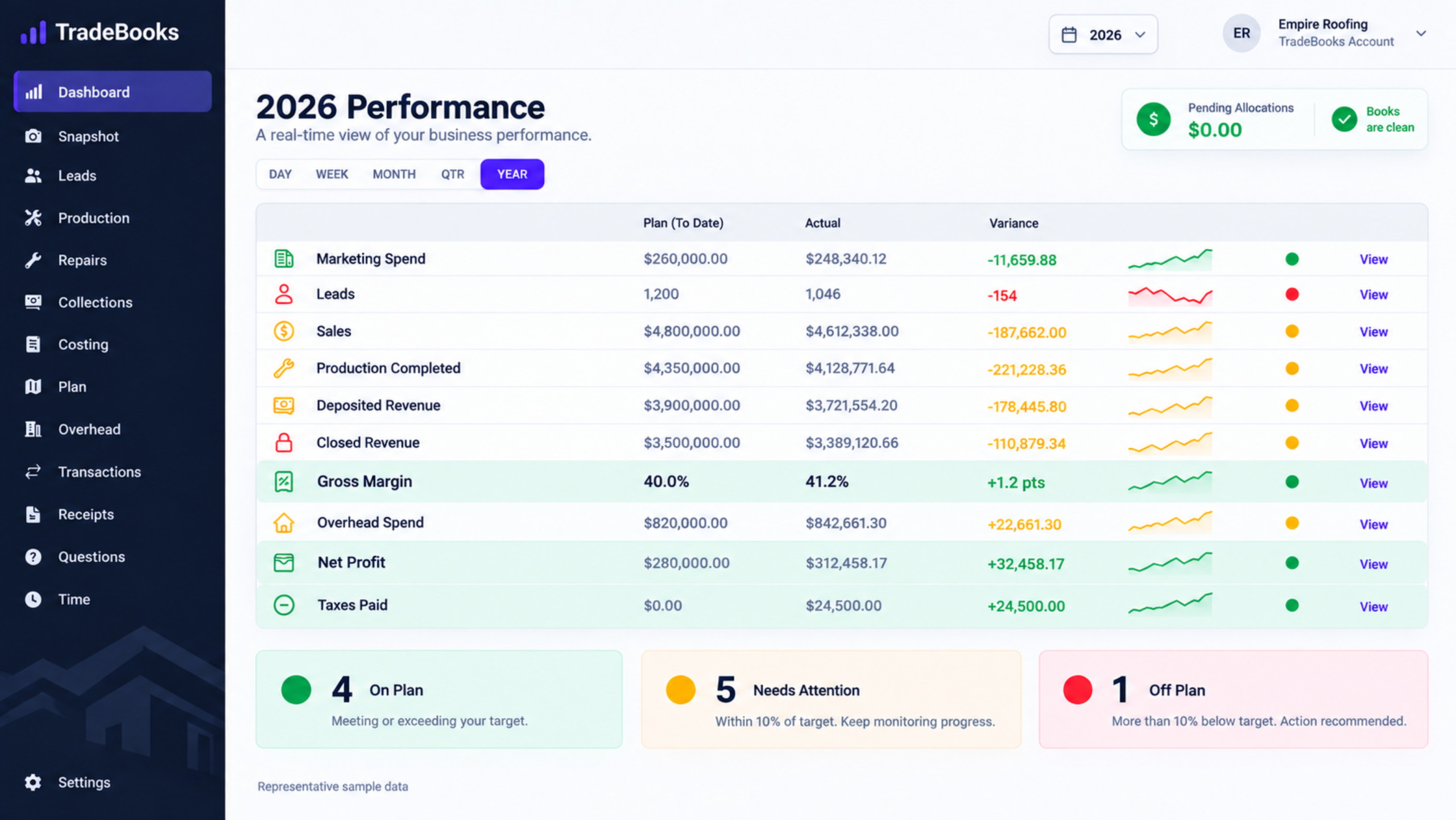
See weekly, monthly, and year-to-date views of the whole business against the plan. One screen shows whether the company is ahead, behind, or on track, and which number moved it.
See It In Action
A TradeBooks demo is a 30-minute walkthrough of the platform, built around the numbers your roofing company is missing right now. You'll see the weekly dashboard, how job margin and overhead roll up into the company view, and exactly what your office would enter each day. If it's a fit, you choose how it runs: on a managed plan, the TradeBooks team keeps the entries current, and on a self-managed plan, your team completes the inputs.
Pricing is published, so you'll know the cost before you ever get on the call. Look over TradeBooks pricing, then weigh it against what one underpriced roof costs you.
Most roofing companies run a gross margin of roughly 20% to 40% and keep somewhere around 5% to 12% as net profit after overhead. Gross margin is what's left of the job after materials, labor, and subs. Net is what's left after overhead too. A strong gross margin with weak net usually means overhead is eating the difference.
It depends on your size and setup, so the only overhead percentage worth bidding on is your own. Add up everything you pay that isn't tied to one job, then divide by annual revenue. If you bid at 15% overhead and actually run 20%, every roof you sell comes up five points short.
Yes, TradeBooks works alongside QuickBooks, the most common accounting program its clients use, as part of your existing accounting workflow. Your books stay where they are, and your accountant keeps working the way they do now. On managed plans, the TradeBooks team enters transactions for you. On self-managed plans, your office handles the entry and TradeBooks turns it into weekly reports.
Plan on a week or more for onboarding, depending on your company, the state of your records, and how quickly the required information comes in. After that, managed plans keep your entries current, generally within 48 hours of your team submitting the information, so your weekly reports show the week you're in, not last quarter.
No, TradeBooks works for contractors across the trades, including HVAC, plumbing, remodeling, electrical, and tile. Roofing is the best fit right now, since storm-driven lead spikes and seasonal swings make company-level numbers matter even more. See who TradeBooks is built for across every trade.
Book a Roofing Demo
A TradeBooks demo shows you how to see overhead percentage, job margin, lead cost, and plan vs. actual every week instead of once a year. You'll leave the call knowing whether TradeBooks fits your roofing company, with no pressure to decide on the spot.
The numbers are framed the way a roofing owner thinks about a job, because TradeBooks was built by a contractor. Flying blind is optional.